
This article continues the discussion from my previous post about Exchange STARTTLS certificate selection. If you’re unfamiliar with how Exchange resolves certificates configured through TlsCertificateName, I recommend reading it first:
📖 Introduction
Recently I came across an interesting Exchange issue related to SMTP certificate renewal.
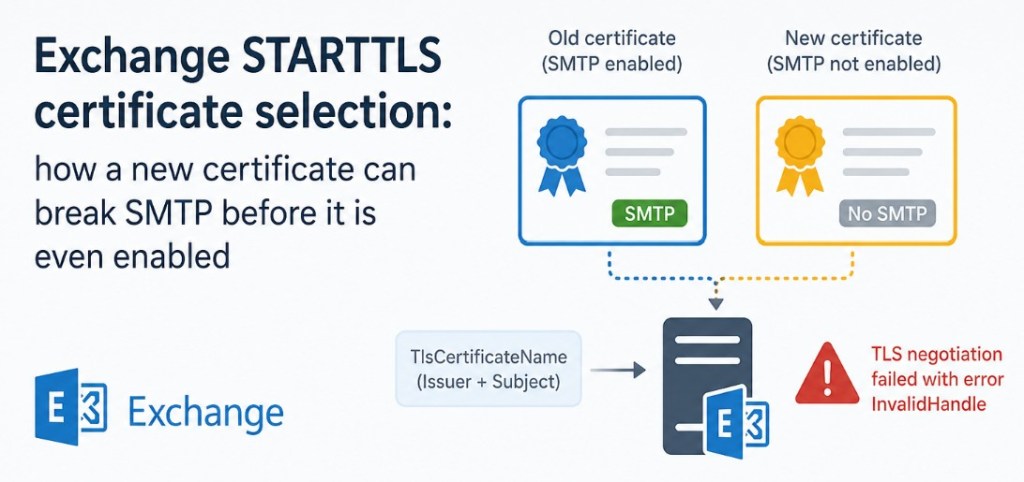
The environment had a receive connector configured with the TlsCertificateName parameter pointing to a third-party TLS certificate. During a routine certificate renewal, the new certificate was imported to the Exchange server in advance, but it was not yet assigned to the SMTP service.
Despite this, Exchange immediately selected the new certificate for STARTTLS, causing inbound TLS failures.
⚠ Symptoms
SMTP Receive logs contained entries similar to the following:
2026-03-18T14:52:31.417Z,EXCH01\Smtp Receive,08DEB8C53760F7FC,7,10.20.15.44:58732,10.20.15.10:25,*,,TLS negotiation failed with error InvalidHandle
Mail flow over STARTTLS failed, while no configuration changes had been made to the receive connector itself.
🖥 Environment
The receive connector explicitly specified the certificate to be used:
Get-ReceiveConnector “EXCH01\Smtp Receive” | fl TlsCertificateName
The value referenced the certificate by Issuer and Subject:
<I>CN=Example RSA OV CA RSA,O=Example RSA OV CA,C=BE
<S>CN=mail.contoso.com
At the same time, the server contained two certificates with identical Issuer and Subject values:
- the currently active certificate;
- the renewed certificate that had been imported in advance.
The renewed certificate had not been enabled for SMTP:
Get-ExchangeCertificate | ft Thumbprint,Services
Example:

🔍 Why did Exchange choose the new certificate?
As described in my previous article, Exchange identifies certificates configured through TlsCertificateName using only the combination of:
- Issuer
- Subject
If multiple certificates match, Exchange selects the newest one.
This behavior is documented by Microsoft.
The important detail is that SMTP service assignment is not part of the certificate selection process.
As a result:
- Exchange found two matching certificates.
- Exchange selected the newer certificate.
- Exchange attempted to use it for STARTTLS.
- Since the certificate had not been enabled for SMTP, TLS negotiation failed with:
TLS negotiation failed with error InvalidHandle
🤔 Why is this confusing?
Most administrators expect Exchange to ignore certificates that are not assigned to SMTP.
However, Exchange first resolves the certificate using TlsCertificateName, and only then attempts to use it.
If the selected certificate cannot be used for SMTP, Exchange does not automatically fall back to the older certificate.
This makes the issue particularly confusing because:
- ✅ the receive connector configuration is correct;
- ✅ the original SMTP certificate is still present;
- ✅ no connector settings have been modified;
- ❌ the only recent change was importing the renewed certificate.
💡 Recommendations
When renewing SMTP certificates on Exchange servers, avoid leaving two matching certificates installed for an extended period if the new certificate has not yet been enabled for SMTP.
A safer approach is to:
- import the certificate shortly before the maintenance window;
- enable it for SMTP immediately after importing it;
- verify STARTTLS functionality;
- only then remove the previous certificate.
Having a documented certificate renewal procedure significantly reduces the risk of unexpected STARTTLS failures.
✅ Conclusion
Although this behavior is consistent with Exchange certificate selection logic, it can be surprising during routine certificate renewal.
If multiple certificates match the configured TlsCertificateName, Exchange selects the newest certificate even if it has not been assigned to the SMTP service.
This may result in unexpected TLS negotiation failed with error InvalidHandle errors and STARTTLS failures, even though no receive connector settings have changed.
End.


Leave a Reply