
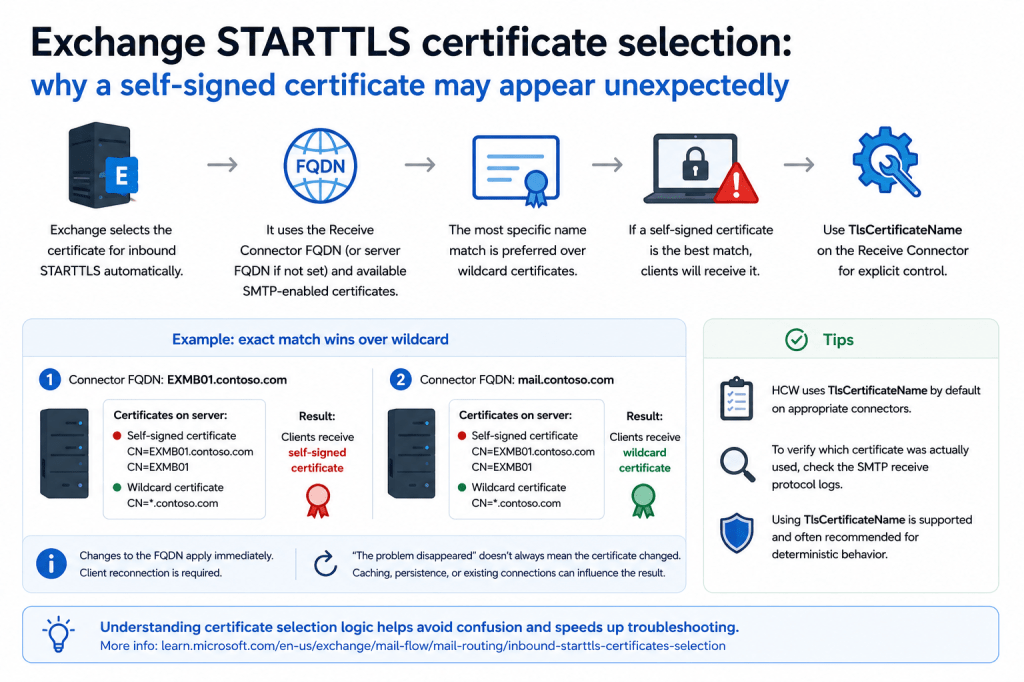
One of the more confusing Exchange transport scenarios occurs when SMTP clients unexpectedly receive a self-signed certificate instead of the public or third-party certificate administrators expected to see.
This situation often appears after:
- adding new Exchange servers into a load balancing pool;
- introducing additional certificates;
- modifying Receive Connector configuration;
- changing connector FQDN values;
- or reconfiguring transport namespaces.
At first glance, the behavior may look random or incorrect.
Administrators often begin troubleshooting:
- load balancers;
- TLS bindings;
- certificate assignments;
- Schannel configuration;
- SMTP services;
- or even networking devices.
However, in many cases:
Exchange is behaving exactly as designed.
Understanding how Exchange selects certificates for inbound STARTTLS is therefore extremely important.
📖 Exchange selects inbound STARTTLS certificates automatically
Microsoft documents the inbound STARTTLS certificate selection process here:
Selection of inbound STARTTLS certificates
Unlike IIS HTTPS bindings, SMTP certificate selection in Exchange transport is not simply:
“use the certificate assigned to SMTP”.
Instead, Exchange transport performs its own automatic certificate selection logic.
Several factors influence certificate selection, including:
- the Receive Connector FQDN;
- the Exchange server FQDN if connector FQDN is not explicitly configured;
- certificate names and SAN entries;
- whether the certificate is SMTP-enabled;
- certificate trust status.
And importantly:
Exchange may select a self-signed certificate if it determines that certificate is the best match.
🧩 A practical real-world scenario
We recently investigated a case where new Exchange servers were added into an existing load-balanced SMTP environment.
After the servers were introduced into the balancing pool, some SMTP clients unexpectedly began receiving self-signed Exchange certificates during STARTTLS negotiation instead of the expected third-party wildcard certificate.
At first glance, this looked inconsistent because:
- the wildcard certificate was installed correctly;
- SMTP service assignment existed;
- TLS functionality itself worked;
- some servers still returned the expected certificate.
However, the behavior was ultimately explained by Exchange STARTTLS certificate selection logic.
🌟 Wildcard certificates and exact name matching
One especially important nuance involves wildcard certificates.
Microsoft documentation describes the general certificate selection process, but does not explicitly describe all wildcard matching preference details.
However, based on observed behavior and lab testing:
Exchange appears to prefer the most specific matching certificate name.
This becomes important in scenarios like the following.
Example:
Installed certificates:
1. Exchange self-signed certificate:
EXMB01.contoso.com
EXMB01
2. Wildcard certificate:
*.contoso.com
Receive Connector configuration:
FQDN = EXMB01.contoso.com
In this scenario, Exchange returns:
the self-signed certificate.
Why?
Because:
EXMB01.contoso.com
is a more specific match than:
*.contoso.com
This behavior may initially appear surprising, but it is logically consistent with Exchange certificate selection behavior.
🧪 Lab validation
We reproduced this behavior in a test environment.
Initial configuration
Installed certificates:
- Exchange self-signed certificate:
- EXMB01.contoso.com
- EXMB01
- Wildcard certificate:
- *.contoso.com
Receive Connector configuration:
FQDN = EXMB01.contoso.com
Result:
SMTP clients received the self-signed certificate.
After changing connector FQDN
Receive Connector configuration changed to:
FQDN = mail.contoso.com
Result:
SMTP clients immediately began receiving the wildcard certificate.
No Exchange service restart was required.
Only the client connection needed to reconnect.
Because this was a clean test environment, the scenario excluded influence from:
- load balancers;
- SMTP persistence;
- TLS caching;
- external appliances;
- delayed AD replication;
- third-party security products.
The behavior was therefore fully reproducible and deterministic.
🛠️ TlsCertificateName allows explicit certificate selection
Exchange also provides a mechanism for explicitly specifying which certificate should be used by a Receive Connector:
TlsCertificateName
When configured, this parameter bypasses automatic certificate selection logic and forces Exchange transport to use the specified certificate.
Because of this:
seeing the correct certificate immediately after configuring TlsCertificateName is expected behavior.
Importantly:
using TlsCertificateName is not an unsupported or abnormal configuration.
In fact, explicit certificate assignment is entirely valid and commonly used in some scenarios.
☁️ Hybrid Configuration Wizard uses TlsCertificateName automatically
A very good example is Exchange Hybrid configuration.
Hybrid Configuration Wizard (HCW) explicitly configures certificates using:
TlsCertificateName
on appropriate Receive Connectors to guarantee deterministic TLS certificate selection.
Microsoft documentation:
TLS certificates in Exchange Hybrid – common issues and how to fix them
This is an important practical example because it demonstrates that:
explicitly defining transport certificates is a normal and supported operational approach.
🔄 “The problem disappeared” does not always mean the certificate changed
Another important troubleshooting nuance is that apparent recovery does not always mean Exchange actually changed the certificate being presented.
SMTP/TLS behavior may be influenced by:
- SMTP session reuse;
- TLS session caching;
- load balancer persistence;
- previously accepted certificates;
- long-lived SMTP connections;
- application-side caching behavior.
This is one reason why some certificate-related problems appear intermittent or inconsistent.
By the time troubleshooting begins:
- the original SMTP sessions may already be gone;
- connections may have re-established;
- certificate selection conditions may already differ.
📜 SMTP protocol logs can confirm actual certificate usage
If necessary, the certificate actually presented during SMTP sessions can be analyzed using Exchange SMTP receive protocol logs.
This is often extremely useful during:
- intermittent TLS issues;
- hybrid mail flow troubleshooting;
- load balancing investigations;
- certificate selection analysis.
Because Exchange transport behavior is often connection-specific, protocol logging may provide much more reliable evidence than point-in-time testing alone.
For example, if connector is related to FrontEnd role and logging is set to verbose, corresponding logs by default will be located here:
C:\Program Files\Microsoft\Exchange Server\V15\TransportRoles\Logs\FrontEnd\ProtocolLog\SmtpReceive
2026-05-14T12:20:25.862Z,EXMB01\Default Frontend EXMB01,08DE7FCC50C94D57,4,172.16.250.66:25,77.90.185.65:20194,<,STARTTLS,
2026-05-14T12:20:25.862Z,EXMB01\Default Frontend EXMB01,08DE7FCC50C94D57,5,172.12.25.26:25,77.91.18.6:20194,>,220 2.0.0 SMTP server ready,
2026-05-14T12:20:25.862Z,EXMB01\Default Frontend EXMB01,08DE7FCC50C94D57, 172.12.25.26:25,77.91.18.6:20194,*,” CN=mail.contoso.com CN=R13, O=Let’s Encrypt, C=US 065C2B71F5AACB1E462A86C7AEEEBD471D72 A14674509A9233B5747694E1CD67B7B0205215B7 2026-02-23T07:40:35.000Z 2026-05-24T07:40:34.000Z mail.contoso.com;autodiscover.contoso.com”,Sending certificate Subject Issuer name Serial number Thumbprint Not before Not after Subject alternate names
🎯 Final thoughts
Unexpected self-signed certificates in Exchange SMTP are not always caused by broken TLS configuration.
In many cases: Exchange transport is simply selecting the certificate it considers the best match according to its internal STARTTLS certificate selection logic.
Understanding:
- Receive Connector FQDN behavior;
- wildcard certificate matching;
- exact-name preference;
- and TlsCertificateName overrides
is therefore extremely important in environments using:
- wildcard certificates;
- multiple SMTP-enabled certificates;
- load-balanced Exchange servers;
- hybrid mail flow;
- or custom transport namespaces.
And perhaps most importantly:
SMTP certificate selection in Exchange transport is much more dynamic and nuanced than traditional IIS certificate bindings.
End.


Leave a Reply