
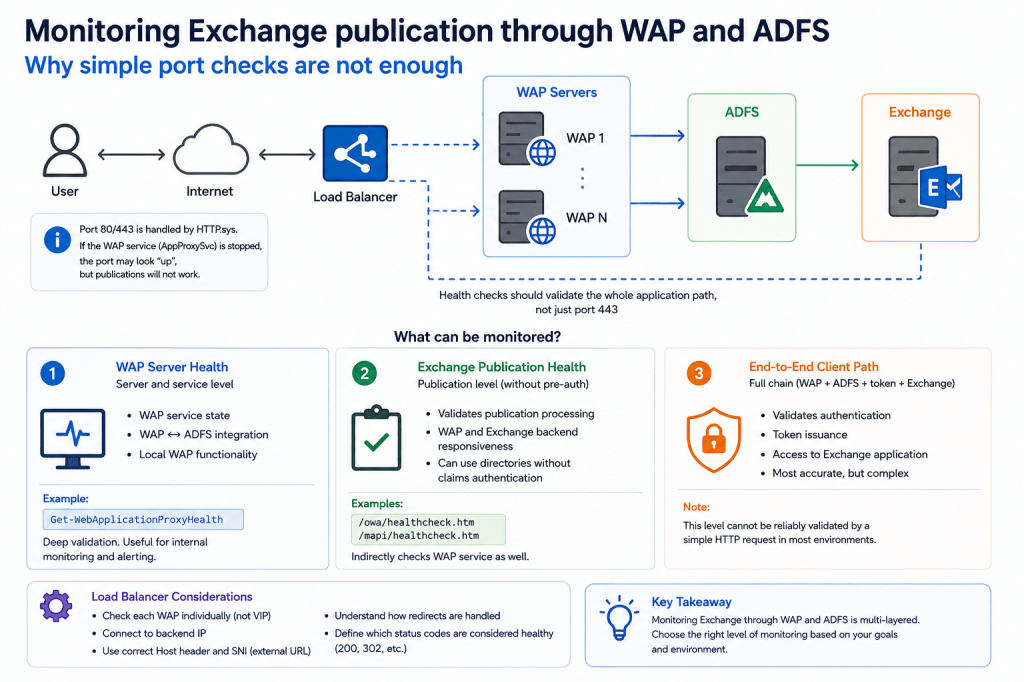
One of the more complicated monitoring scenarios we recently encountered involved Exchange publication through:
- Web Application Proxy (WAP);
- ADFS;
- claims-based authentication;
- and external load balancing.
At first glance, the problem appeared deceptively simple:
- TCP port 443 was reachable;
- HTTPS connections succeeded;
- ADFS health probes worked;
- the WAP server itself looked online.
However:
Exchange publication through WAP was no longer functioning correctly.
And this revealed an important operational reality:
monitoring modern Exchange publishing chains is significantly more complicated than simply checking whether port 443 responds.
🧩 Why port 443 remains “healthy” even when WAP is broken
One important technical detail is that:
WAP itself does not directly own ports 80/443.
HTTPS traffic is handled by HTTP.sys which operates at the operating system kernel level.
Because of this:
- stopping the WAP service itself (AppProxySvc);
- does NOT necessarily make port 443 unavailable.
From the load balancer perspective:
- TCP connection succeeds;
- HTTPS handshake succeeds;
- the server appears reachable.
However: publication processing itself no longer works.
This creates a dangerous situation where a non-functional WAP server may remain inside the balancing pool.
This is conceptually similar to Exchange IIS behavior:
- port 443 may remain available;
- IIS itself may respond;
- but OWA may still fail because the responsible application pool is stopped.
🔍 WAP does not have its own application health endpoint
Unlike Exchange:
/owa/healthcheck.htm
WAP itself does not provide a dedicated health endpoint validating publication functionality.
There is:
/adfs/probe
However, this endpoint validates:
- ADFS availability;
- WAP ↔ ADFS integration;
rather than the actual published Exchange application.
This distinction is extremely important.
🔄 Claims-based authentication complicates health checks
In environments using claims-based authentication, monitoring becomes even more complicated.
For example:
/owa/healthcheck.htm
does not simply return:
HTTP 200
Instead:
- the request is redirected to ADFS;
- pre-authentication occurs;
- token processing is involved.
Because of this:
directly validating Exchange publication through a simple HTTP request becomes difficult.
Ideally, monitoring would validate:
- WAP;
- ADFS;
- authentication;
- token issuance;
- Exchange publication;
- final application response.
However:
fully validating the entire authentication chain through a synthetic transaction is often unrealistic for load balancers.
⚖️ The load balancer challenge
To properly validate WAP publication, the load balancer ideally needs to:
- test each WAP individually;
- connect directly to backend server IPs;
- use the external published hostname;
- support SNI for backend health checks.
Conceptually, the model becomes:
TCP → specific WAP server
Host header → published external URL
SNI → published external URL
For example:
curl.exe -skL https://mail.contoso.com/owa/healthcheck.htm `
–resolve mail.contoso.com:443:172.12.250.8 `
-o NUL `
-w “%{http_code}`n”
Where:
- 172.16.250.8 = specific WAP server;
- mail.contoso.com = published external namespace.
📋 Interpreting results is not always straightforward
Even once such checks are implemented, interpretation still becomes complicated.
For example:
200
may indicate:
- successful redirect processing;
- functional WAP publication;
- successful ADFS interaction.
While:
503
may indicate:
- WAP service failure;
- publication processing failure;
- broken publishing pipeline.
However:
actual interpretation depends heavily on load balancer capabilities and redirect handling behavior.
An important question becomes:
- does the load balancer validate the initial response?
- or the final redirected response?
- are redirects considered healthy?
- which status codes are accepted?
- can this behavior be customized?
Different load balancers handle this very differently.
🚫 Some load balancers simply cannot perform this type of validation
A particularly difficult scenario occurs when the load balancer cannot independently configure:
- backend IP;
- Host header;
- SNI values.
In such cases:
validating individual WAP servers through the shared VIP may become impossible.
And this creates a serious operational limitation.
🛠️ One possible workaround: dedicated per-WAP publications
One workaround is creating dedicated publication endpoints for each WAP server individually.
Conceptually:
- each WAP receives its own external URL;
- each publication uses separate backend configuration;
- health checks are performed directly against individual WAP names.
For example:
curl.exe -skL https://exch-wap1.contoso.com/owa/healthcheck.htm `
-o NUL `
-w “%{http_code}`n”
This allows:
- direct validation of specific WAP nodes;
- simpler health logic;
- better visibility of failing nodes.
However, this approach also introduces disadvantages:
- additional publications;
- more configuration complexity;
- additional namespaces;
- monitoring paths that differ slightly from actual client traffic.
🧠 What exactly should be monitored?
One important realization during this project was that:
there is no single universally “correct” health check.
Different monitoring goals exist.
For example:
🖥️ WAP server health
This includes:
- WAP service state;
- WAP ↔ ADFS integration;
- local WAP functionality.
Useful tools include:
Get-WebApplicationProxyHealth
This performs significantly deeper validation than simple TCP checks.
It validates:
- WAP service functionality;
- integration with ADFS;
- internal WAP operational state.
This is often useful for:
- internal monitoring;
- alerting;
- operational visibility.
📨 Exchange publication health
This validates:
- Exchange publication availability;
- WAP publication processing;
- Exchange backend responsiveness.
Examples:
/owa/healthcheck.htm
/mapi/healthcheck.htm
One practical option is using directories that do NOT require claims-based authentication.
However:
such directories may need separate publication configuration.
🔐 Full client authentication chain
This would validate:
- WAP;
- ADFS;
- token issuance;
- Exchange;
- final authenticated application access.
However:
this becomes an entirely different level of complexity.
And realistically:
this usually cannot be validated by a simple HTTP health probe alone.
🤔 Why there is no “canonical” solution
One reasonable question is:
why does Microsoft not provide a standard official monitoring solution for this scenario?
In practice, the answer is probably relatively simple:
- the scenario itself is not extremely common;
- every load balancer behaves differently;
- WAP + ADFS + Exchange chains vary significantly;
- much of the implementation depends on third-party infrastructure.
Most organizations therefore use simpler approaches such as:
- TCP checks;
- /adfs/probe;
- redirect-aware health checks;
- load balancer redirect processing.
More advanced scenarios involving:
- synthetic authentication;
- token validation;
- full publication chain testing;
are significantly more complicated and highly environment-specific.
⚠️ Monitoring from a “third-party observer” has its own risks
Another proposed idea was using an external “observer” server to validate WAP availability.
However, this introduces its own concerns.
In this model a server not involved in actual client traffic becomes responsible for determining Exchange availability.
This adds:
- additional infrastructure complexity;
- another dependency;
- another potential failure point.
Because of this, local monitoring plus balancing integration is often preferable.
💡 A practical operational approach
From a practical perspective, one reasonable model may be:
- local WAP monitoring;
- alerting through internal monitoring systems;
- health validation of Exchange publication;
- and automatic removal from balancing pools if required.
Ultimately:
the optimal implementation depends heavily on the capabilities of the specific load balancer and operational requirements.
And perhaps most importantly: monitoring modern authentication and publishing chains is fundamentally more complicated than checking whether port 443 responds.
End.
 EWS Free Area
Leave a comment