
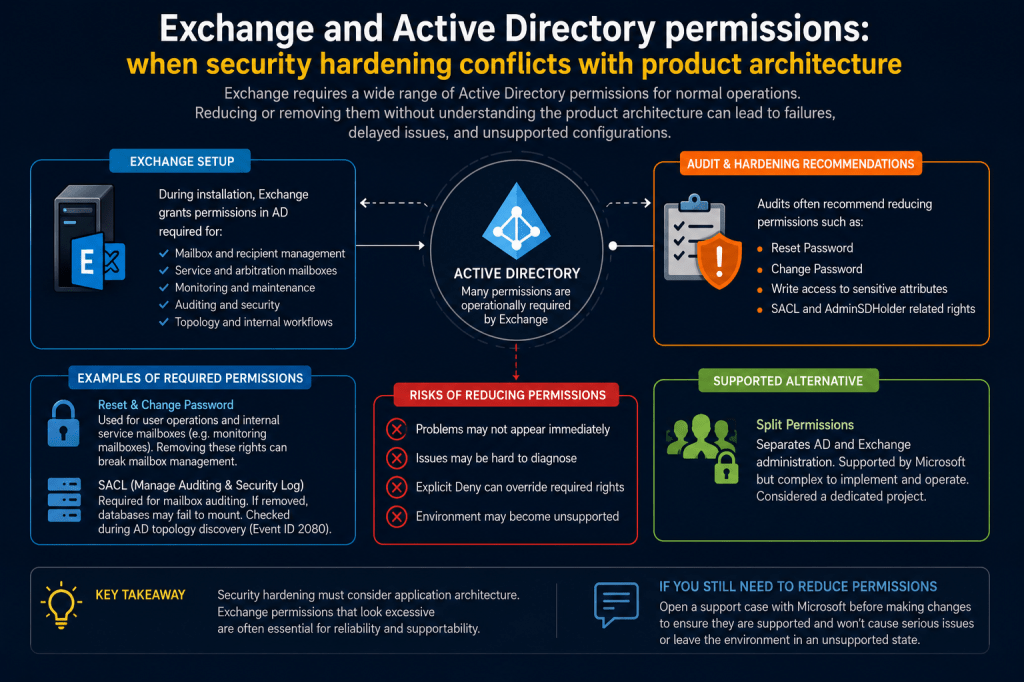
One recurring topic during Active Directory security audits in Exchange environments is the large number of permissions granted to Exchange-related security groups during installation.
From a traditional Active Directory security perspective, some of these permissions may indeed appear excessive or even dangerous.
This regularly leads to recommendations such as:
- remove extended rights;
- restrict Reset Password permissions;
- remove Change Password permissions;
- reduce Exchange-related ACLs;
- remove built-in Exchange groups;
- apply explicit Deny entries;
- minimize inherited permissions.
At first glance, such recommendations may appear logical.
However, Exchange is not a generic Active Directory workload.
Exchange is deeply integrated with Active Directory, and many permissions that appear excessive are actually part of the supported product architecture.
🔎Exchange uses Active Directory extensively
Exchange does not simply “store mailboxes in AD”.
The product actively interacts with Active Directory objects and permissions as part of its normal operation.
This includes:
- mailbox provisioning;
- mailbox removal;
- recipient management;
- arbitration mailboxes;
- monitoring mailboxes;
- RBAC-related operations;
- service object management;
- topology discovery;
- auditing functionality;
- internal maintenance workflows.
Because of this, Exchange requires a broad set of Active Directory permissions for both administrative and internal service operations.
⚠️Why security audits often flag Exchange permissions
From the perspective of generic AD hardening guidance, permissions such as:
- Change Password;
- Reset Password;
- WriteProperty on sensitive attributes;
- SACL-related rights;
- AdminSDHolder-related permissions;
may legitimately raise concerns.
For example, one recent audit recommendation stated:
“Limit Domain Level Extended Right: Reset Password on Security Principals delegation to administrators only.”
From a pure Active Directory perspective, such recommendations are understandable.
However, audits often do not – and in many cases cannot – fully account for the internal architecture and supported operational model of applications such as Exchange.
📱Reset Password and Change Password rights
One of the most frequently discussed examples involves the following extended rights:
- Reset Password
- Change Password
Microsoft documents Exchange-related permissions here:
📎Exchange permissions reference
In practice, these rights are not only used for user-facing mailbox operations.
Exchange also uses them for internal service workflows.
For example, Exchange automatically manages passwords for various internal service and monitoring mailboxes.
Microsoft documentation: 📎Exchange monitoring mailboxes
Because of this, removing or restricting these permissions may lead to partial or complete Exchange malfunction.
An especially important detail is that problems may not appear immediately.
The environment may continue functioning normally for some time before issues begin appearing during:
- mailbox creation;
- mailbox removal;
- monitoring mailbox recreation;
- cumulative updates;
- disaster recovery operations;
- maintenance tasks.
This delayed behavior makes resulting problems especially difficult to diagnose later.
⚠️Microsoft does not document supported removal of these permissions
An important point here is not whether it is technically possible to modify these permissions.
In many cases, it is.
The more important question is:
Is such configuration supported and validated by Microsoft?
Based on available Microsoft documentation and practical support experience:
- Microsoft does not document supported removal of these permissions;
- Microsoft does not provide official validation confirming such changes are safe;
- removing built-in Exchange groups or permissions may create unsupported configurations.
🔁Why explicit Deny permissions are especially dangerous
One particularly risky approach is the use of explicit Deny ACEs.
For example:
- Deny Reset Password
- Deny Change Password
This is especially problematic because Deny permissions override Allow permissions and may affect inherited permissions in non-obvious ways.
As a result:
- troubleshooting becomes significantly more complicated;
- behavior may become inconsistent;
- failures may affect only certain workflows;
- operational issues may appear long after the change was introduced.
For this reason, explicit Deny entries for Exchange-related permissions are strongly discouraged.
🔁AdminSDHolder and documentation inconsistencies
Another interesting example involves permissions related to AdminSDHolder.
Some historical Microsoft documentation for Exchange 2013 describes write permissions granted to the Exchange Windows Permissions group for attributes such as userAccountControl on the AdminSDHolder object.
📎Exchange 2013 deployment permissions reference
For example, the documentation describes permissions similar to:
Exchange Windows Permissions
Allow ACE
Write Property
userAccountControl
From the perspective of Active Directory security teams, this naturally raises serious concerns because improper modification of userAccountControl could potentially affect privileged administrative accounts.
However, practical verification in real environments may show different results.
For example:
dsacls “CN=AdminSDHolder,CN=System,DC=contoso,DC=com”
may show only read access:
Allow CONTOSO\Exchange Servers
SPECIAL ACCESS for userAccountControl
READ PROPERTY
without corresponding write permissions for Exchange Windows Permissions.
This raises an interesting question regarding the relationship between:
- historical documentation;
- Exchange setup behavior;
- cumulative updates;
- inherited permissions;
- and actual ACL state in production environments.
At minimum, this demonstrates that Exchange-related Active Directory permissions should be validated technically in the actual environment rather than interpreted solely from documentation excerpts.
⚠️Some permissions are operationally critical
Some Exchange-related Active Directory permissions are not merely optional administrative capabilities.
They are operationally required.
For example, when Exchange is installed in the forest, the Exchange Servers group receives permissions related to managing auditing and security logs.
At first glance, this may also appear excessive.
However, this permission is required for mailbox auditing functionality because Exchange needs the ability to read System Access Control Lists (SACLs) from domain controllers.
If this permission is removed:
Exchange databases may fail to mount.
This behavior applies to multiple Exchange versions.
Exchange even validates these permissions during Active Directory topology discovery.
This can be observed in Event ID 2080:
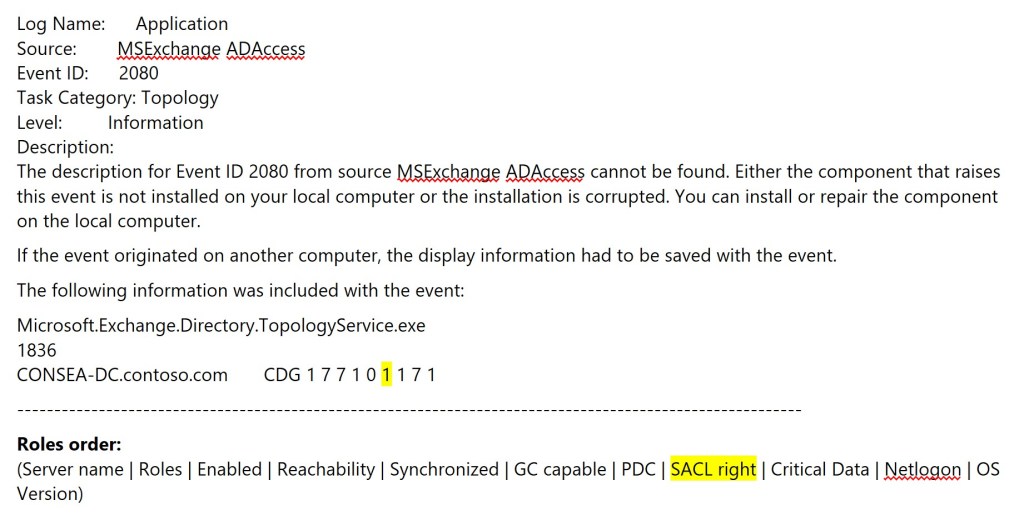
The presence of the SACL check itself demonstrates that this permission is considered part of the expected Exchange operational model.
🛠 What about split permissions?
If strict separation between Active Directory administration and Exchange administration is required, Microsoft does provide a supported model for this scenario: Split permissions.
Microsoft documentation: 📎Split permissions in Exchange
However, several important caveats exist:
- implementing split permissions in existing environments is a separate project;
- deployment complexity increases significantly;
- operational administration becomes more difficult;
- migration to split permissions may itself introduce risks.
Because of this, split permissions should be approached as a carefully planned architectural decision rather than a quick hardening measure.
🛠 If permission reduction is still required
In some organizations, security or compliance requirements may still require reducing Exchange-related Active Directory permissions beyond the default product configuration.
If such changes are considered necessary, the safest approach is to involve Microsoft Support before implementing the changes.
This is especially important because:
- Exchange is deeply integrated with Active Directory;
- some permissions are used only in specific operational scenarios;
- resulting problems may appear much later;
- unsupported permission changes may complicate future troubleshooting and support cases.
Opening a support case with Microsoft before implementing permission modifications may help:
- validate whether the scenario is supported;
- identify known risks or limitations;
- avoid configurations that could leave the environment in an unsupported state.
Even then, any permission reduction should ideally first be tested in a dedicated lab environment that accurately reflects the production architecture.
✅ Conclusion
Security hardening recommendations should always be evaluated in the context of the application architecture they affect.
Exchange is deeply integrated with Active Directory, and many permissions that initially appear excessive are actually part of the supported product design.
This does not mean such permissions should never be reviewed.
However:
modifying Exchange-related permissions without fully understanding their operational purpose may reduce not only privileges, but also stability and supportability.
And perhaps most dangerously:
resulting problems may not appear immediately, making them extremely difficult to correlate with the original permission changes later.
End.
 EWS Free Area
Leave a comment