
In our previous post, we discussed why an Exchange Database Availability Group (DAG) with an even number of members should always have a properly configured File Share Witness (FSW), and how the absence of the witness resource may remain unnoticed for a long time.
📖 Previous article:
📎Exchange DAG with an even number of nodes and no File Share Witness: a hidden risk”
This time we would like to describe one particularly interesting real-world scenario related to dynamic quorum behavior in a large multi-site DAG deployment.
As usual, the environment details below are intentionally generalized and anonymized, while preserving the technical aspects of the incident.
Initial architecture
The customer had a relatively standard multi-datacenter Exchange DAG deployment:
- two primary datacenters hosting Exchange servers;
- one additional datacenter hosting the File Share Witness;
- an even number of DAG members distributed symmetrically between the two primary sites.
Each mailbox database had copies in both datacenters.
From a high-availability perspective, the design itself was generally correct and corresponds preferred architecture.
🔎 The incident
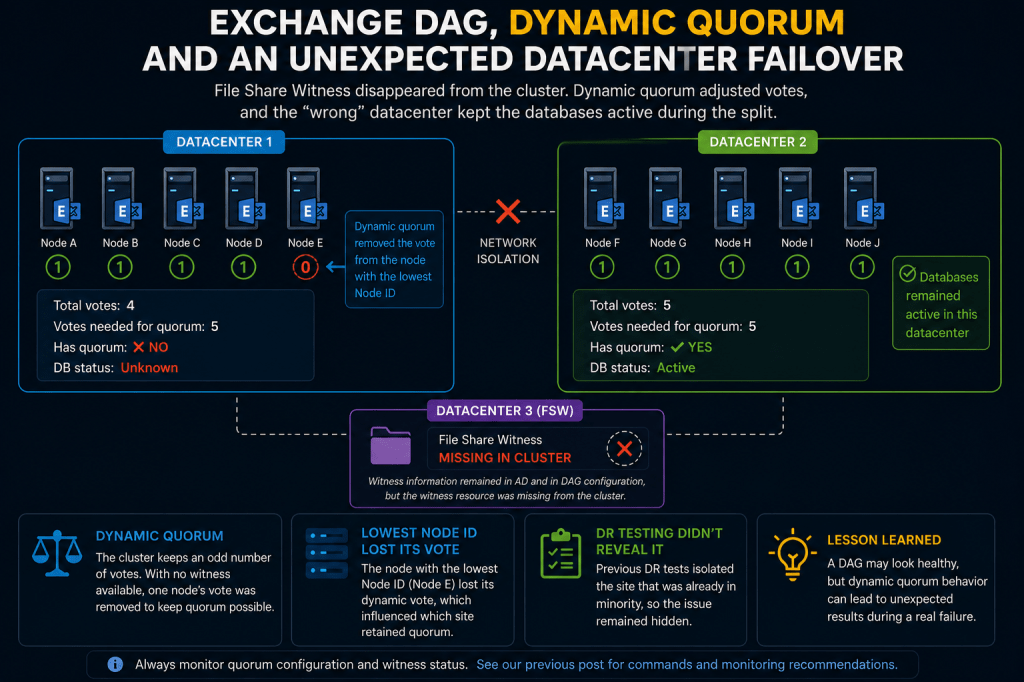
At some point, communication between the two primary datacenters was lost. Actually, one of datacenters was isolated from network perspective.
From the customer’s perspective, the expected behavior was:
- one datacenter obtains majority;
- databases activate there;
- the other site loses quorum and dismounts databases.
However, the actual behavior was different.
Databases remained active only in one isolated site, while the second datacenter lost quorum and all databases became unavailable there.
The problem became especially confusing because from the Exchange perspective, the DAG itself continued functioning correctly.
The issue was that users could no longer reach the datacenter where the databases remained active due to the network isolation scenario.
🧠 What was discovered during analysis
The key finding was unexpected:
At some point in the past, the File Share Witness resource disappeared from the cluster configuration.
Importantly:
- DAG configuration in Exchange still contained witness information;
- the witness settings still existed in Active Directory;
- however, the witness resource itself no longer existed inside the actual cluster quorum configuration.
This meant the cluster was effectively operating without a functioning File Share Witness despite the DAG still appearing normally configured from the Exchange side.
📱 Why the environment continued working
This is where dynamic quorum becomes important.
Modern versions of Windows Failover Clustering support a feature called dynamic quorum.
Microsoft documentation: 📎Dynamic quorum overview
Dynamic quorum allows the cluster to dynamically adjust quorum voting in order to maximize cluster survivability during failures.
In simplified terms:
- nodes may dynamically lose or gain voting rights;
- the number of votes required for majority may change automatically;
- the cluster attempts to avoid unnecessary shutdowns.
This behavior is expected and fully supported.
🔁 What happened in this specific case
The DAG contained an even number of nodes, but no working File Share Witness.
Because of this:
- dynamic quorum removed the dynamic vote from one node;
- the cluster recalculated the required majority;
- quorum became achievable with fewer votes.
This is normal cluster behavior.
However, during the datacenter isolation scenario, the vote distribution unexpectedly favored one site over the other.
As a result:
- one datacenter retained quorum;
- the other datacenter lost quorum;
- databases were automatically dismounted there.
From the cluster perspective, everything worked exactly as designed.
From the customer perspective, however, the result was unexpected because the “wrong” datacenter retained active databases.
🔁 Why previous DR testing did not reveal the issue
An especially interesting aspect of this incident is that the customer had previously performed disaster recovery testing.
However, based on the observed behavior, it appears that earlier DR scenarios likely isolated or shut down the datacenter that was already in the minority from the quorum perspective.
Because of this:
- the surviving site still retained quorum;
- databases activated as expected;
- the underlying quorum asymmetry remained unnoticed.
The problem only became visible when the opposite datacenter became isolated.
This is an important operational lesson:
Successful DR testing does not necessarily validate all quorum and split-site scenarios.
Different isolation directions may produce completely different cluster behavior.
🔁 Why this specific datacenter retained quorum
Another important detail is that the cluster dynamically removed the vote from the node with the lowest Node ID.
This behavior is related to quorum tie-breaker logic used during 50% node split scenarios.
Microsoft documentation: 📎Failover cluster quorum understanding
As part of dynamic quorum functionality:
- the cluster attempts to maintain an odd number of votes;
- if no witness is available, the cluster may dynamically remove a node vote;
- by default, this may depend on node ordering and internal cluster logic.
In the investigated environment, the node with the lowest Node ID lost its dynamic vote, which resulted in one datacenter having fewer effective votes during the isolation event.
This ultimately determined which site retained quorum.
🛠 How to verify this configuration
As discussed in the previous article, it is important to verify both Exchange DAG configuration and actual cluster quorum state.
Check DAG witness configuration
Get-DatabaseAvailabilityGroup -Status | fl Name,WitnessServer,WitnessDirectory,OperationalServers
Check cluster quorum configuration
Get-ClusterQuorum
Check cluster resources
Get-ClusterResource
Check dynamic vote assignments
Get-ClusterNode | ft Name, Id, NodeWeight, DynamicWeight
Witness vote state may also be checked with:
Get-Cluster | fl *weight*
📌 How was the issue identified?
The exact moment when the witness resource disappeared could not be determined with complete certainty because older cluster logs were no longer available.
However, cluster events allowed estimating the approximate timeframe when the witness resource stopped functioning.
The environment also showed signs that:
- the witness had previously existed and functioned correctly;
- the DAG configuration itself had not been recreated recently;
- the quorum model had likely changed long before the actual incident occurred.
✅ Possible causes
We cannot definitively state the exact root cause.
However, based on the observed behavior, the most likely explanations include:
- manual cluster quorum modification;
- unsupported cluster-level administrative actions;
- direct Failover Cluster cmdlet usage;
- incomplete maintenance procedures;
- cluster reconfiguration performed outside Exchange management tools;
- probably unknown issues during upgrades.
For example, behavior similar to the observed configuration can be reproduced using cluster-level commands such as:
Set-ClusterQuorum -NoWitness
However, this type of direct quorum modification is not supported in Exchange environments.
📌 Important operational note
In Exchange environments, administrators are generally not expected to manage quorum configuration manually through Failover Cluster tools.
Exchange automatically adjusts quorum configuration when DAG members are added or removed using Exchange management tools.
For this reason:
Direct modification of cluster quorum configuration outside Exchange management procedures is generally not recommended and may lead to unexpected or unsupported behavior.
If quorum configuration needs to be reapplied, Exchange cmdlets such as Set-DatabaseAvailabilityGroup should be used instead.
In the investigated environment, reapplying DAG configuration recreated the missing File Share Witness resource and restored expected quorum behavior.
📌 Can this behavior be controlled?
Windows Failover Clustering supports the LowerQuorumPriorityNodeID cluster property.
This setting allows administrators to influence which node loses its vote during a 50% node split scenario where neither side would otherwise have majority.
This mechanism can be used to predetermine which datacenter is considered less critical.
For example:
- primary production site may be preferred;
- disaster recovery site may be configured to lose quorum first.
Microsoft documentation: 📎Dynamic quorum tie breaker behavior
To determine node IDs:
Get-ClusterNode | ft Name, Id, NodeWeight, DynamicWeight
Example configuration:
(Get-Cluster).LowerQuorumPriorityNodeID = 1
However, as with other cluster-level quorum settings in Exchange environments, any such configuration should be carefully evaluated and fully understood before implementation.
✅ Conclusion
One of the most deceptive aspects of dynamic quorum is that it may successfully keep the cluster operational even when the underlying quorum design is already degraded.
This is beneficial from a survivability perspective.
However, it also means that configuration problems may remain hidden until a very specific failure scenario occurs.
In this case:
- Exchange itself behaved correctly;
- Windows Failover Clustering behaved correctly;
- dynamic quorum behaved correctly;
But the resulting infrastructure behavior was still unexpected from the operational perspective.
That distinction is extremely important when designing and monitoring large multi-site Exchange DAG deployments.
End.


Leave a Reply