
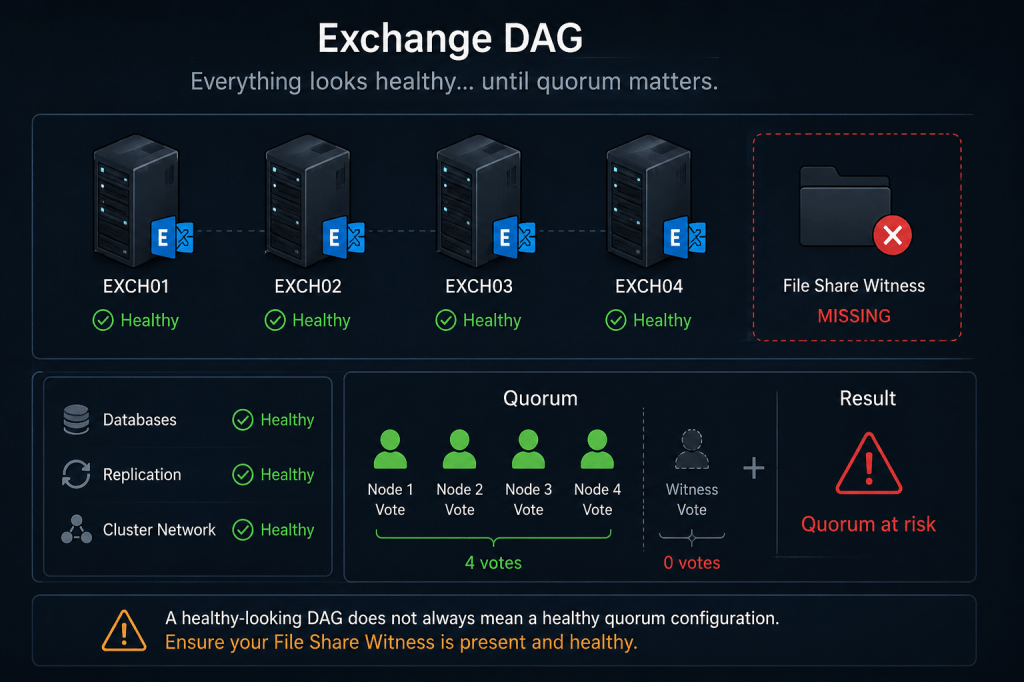
Over the last few months, we encountered several Exchange environments where Database Availability Groups (DAGs) with an even number of members were operating without a configured or functional File Share Witness (FSW).
What made these cases particularly interesting is that in some environments the DAG continued to function normally for quite a long time. Databases remained mounted, replication was healthy, and no obvious cluster failures were visible to administrators.
However, during one especially interesting incident involving a larger number of DAG members, dynamic quorum recalculated voting assignments in a way that led to unexpected behavior from the customer’s perspective. We will describe that specific scenario separately in another post, as it deserves its own detailed analysis.
Still, these cases highlight an important point:
A DAG may appear healthy while its quorum configuration is already degraded.
🧠 What is quorum in a Failover Cluster?
Exchange DAG relies on Windows Failover Clustering.
Like any cluster, it requires a mechanism to determine which part of the cluster is allowed to remain operational during failures or network partitions.
This mechanism is called quorum.
The purpose of quorum is to prevent situations where multiple isolated parts of the cluster simultaneously believe they are authoritative and attempt to mount the same databases independently (the so-called split-brain scenario).
In simplified terms, the cluster must maintain a majority of votes in order to continue functioning.
🔍 Quorum models in Windows Failover Clustering
Windows Failover Clustering supports several quorum models.
Common ones for Exchange DAG deployments are:
| Quorum model | Description | Typical Exchange usage |
| Node Majority | Each node has a vote | DAGs with an odd number of members |
| Node and File Share Majority | Nodes + File Share Witness vote | DAGs with an even number of members |
✅What does File Share Witness actually do?
One common misconception is that the File Share Witness stores Exchange databases or replication data.
It does not.
The File Share Witness exists solely to provide an additional quorum vote.
For example:
- 2 DAG members + FSW = 3 votes total
- 4 DAG members + FSW = 5 votes total
This allows the cluster to maintain majority during node failures. When DAG members are added or removed using Exchange management tools (PowerShell or EAC), Exchange automatically adjusts the underlying cluster quorum configuration and quorum model as required.
Administrators generally should not manually modify quorum configuration using Failover Cluster cmdlets or Failover Cluster Manager unless there is a very specific and well-understood reason to do so.
Without the witness, an even-numbered DAG may lose quorum much more easily under certain failure conditions.
⚠️What happens if the File Share Witness is missing?
The answer depends on the DAG topology.
Two-node DAGs
This is the most critical scenario.
In a two-node DAG:
- Node 1 = 1 vote
- Node 2 = 1 vote
Without File Share Witness, the cluster has only two votes total.
If one node becomes unavailable, the remaining node no longer has majority ownership and the cluster loses quorum.
In practice, this means:
- databases may dismount;
- cluster services may stop;
- DAG functionality becomes unavailable.
It is important to understand that dynamic quorum does not effectively protect classic two-node DAG designs from this situation.
Larger DAGs
With larger numbers of DAG members, the situation becomes more complicated.
Modern versions of Windows Failover Clustering support dynamic quorum, which can dynamically recalculate voting assignments during failures.
Because of this, a DAG may continue operating for quite some time even if the File Share Witness is unavailable or missing entirely.
This creates a dangerous false sense of stability.
Administrators may see:
- healthy replication;
- mounted databases;
- no obvious DAG alerts;
- apparently normal cluster operation.
However, during additional failures, maintenance operations, network segmentation, or node outages, quorum behavior may suddenly become very different from what administrators expect.
This was exactly the type of situation we observed in one of the environments mentioned earlier.
⚠️Why this is dangerous
A degraded quorum configuration may remain unnoticed until the environment enters a failure scenario.
Potential consequences include:
- unexpected cluster shutdown;
- inability to mount mailbox databases;
- quorum loss during planned maintenance;
- asymmetric cluster behavior;
- operational confusion during incident response;
- increased recovery time during outages.
In many environments, administrators actively monitor Exchange database health but do not monitor quorum state itself.
This can allow quorum-related problems to remain hidden for extended periods of time.
✅ How to verify the current configuration
Check DAG witness configuration
Get-DatabaseAvailabilityGroup -Status | fl Name,WitnessServer,WitnessDirectory,WitnessShareInUse,OperationalServers
Name : DAG01
WitnessServer : fsw1.cotoso.com
WitnessDirectory : C:\FileShareWitness\DAG01
WitnessShareInUse : Primary
OperationalServers : {EXMB01, EXMB02}
Check cluster quorum configuration
Get-ClusterQuorum
Cluster : DAG01
QuorumResource : File Share Witness (\\fsw1.contoso.com\DAG01.contoso.com)
QuorumType : Majority
FSW resource should exist in configuration with even number of nodes.
Check cluster resources
Get-ClusterResource
Name : File Share Witness (\\fsw1.contoso.com\DAG01.contoso.com)
State : Online
OwnerGroup : Cluster Group
ResourceType : File Share Witness
Pay attention to:
- missing witness resources;
- offline witness resources;
- failed cluster resources.
Check weights for nodes and FSW
Get-ClusterNode | ft name,*wei*
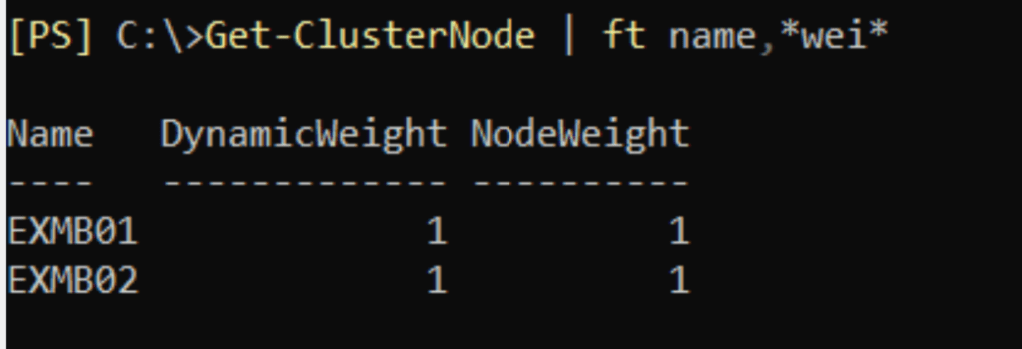
(Get-Cluster).WitnessDynamicWeight

Monitoring recommendations
It is important not only to configure the witness correctly, but also to monitor its health continuously.
Recommended monitoring areas include:
- quorum state;
- witness resource status (Computer name and IP address for DAG, if applicable);
- cluster events;
- witness share accessibility;
- cluster network issues.
Monitoring only mailbox database replication status is not sufficient to detect all quorum-related risks.
🧩 About the root cause
In the environments we investigated, the exact reason why the witness resource disappeared could not be reliably determined (as issue happened long time ago, or customer didn’t want to investigate it).
Possible causes may include:
- manual cluster modifications;
- incomplete maintenance procedures;
- failed cluster reconfiguration;
- witness server issues;
- unsupported administrative actions.
✅ Final thoughts
One of the most dangerous aspects of quorum-related problems is that the environment may continue functioning normally for a long time.
This creates the illusion that the configuration is healthy.
In reality, the DAG may already be operating with reduced fault tolerance, and the issue may only become visible during the next failure or maintenance event.
A healthy-looking DAG does not always mean a healthy quorum configuration.
End.


Leave a comment