
🧩Windows Extended Protection
🔗Windows Extended Protection (EP) enhances the existing authentication in Windows Server and mitigates authentication relay or “man in the middle” (MitM) attacks. EP is supported on Exchange Server 2013, 2016 and 2019 starting with the 🔗August 2022 Exchange Server Security Update (SU) releases.
So far, this feature requires manual enablement, for example, with ExchangeExtendedProtectionManagement.ps1 script, which is hosted on the Microsoft Exchange-CSS repository on GitHub.
According to blog post from Exchange product group 🔗Coming Soon: Enabling Extended Protection on Exchange Server by Default, EP will be enabled by default when CU14 (or later) is installed.
Of cause, you can opt-out, but only using command-line version of Setup (opt-in to EP is default setting). Once this version CU is available (not available so far at the moment of posting this), we should get more details on that behavior.
EP is recommended by the product group, so if you consider implementing it, it’s recommended to evaluate all risks and carry out testing and handle changes in your infrastructure, if you they are required.
There may be multiple reasons why some or all clients may start giving authentication errors to users after enabling Extended Protection including inconsistent TLS configuration on your Exchange servers, SSL offloading feature enabled ion your load-balancers, Modern Hybrid or the Hybrid Agent implemented for Hybrid configuration, Third-party software compatibility and so in.
As Extended Protection enhances the existing Windows authentication, OWA / ECP with ADFS Auth or applications using Hybrid Modern Authentication in your Hybrid Environment are not impacted by this change.
Please, carefully read through this blog post to get more information on possible issues and configuration details: 🔗Exchange Server Support for Windows Extended Protection
🛠️Troubleshooting client connectivity with Fiddler
Many of us familiar with 🔗Fiddler and use it for troubleshooting client connectivity issues. Fiddler is a web-debugging tool that monitors, inspects, edits, and logs all HTTP(S) traffic, issues requests between your computer and the Internet, and fiddles with incoming and outgoing data.
This appropriate configuration Fiddler Classic can decrypt HTTPS traffic and is often used to troubleshoot Outlook and OWA connections. However, to make it possible, Fiddler terminates HTTPS traffic and plays the role of “man in the middle”. With default Fiddler configuration, EP breaks this opportunity unless you use Hybrid Modern Authentication in your Hybrid Environment or other authentication methods not affected by EP. In that case, Security logs on Exchange Servers will have events about authentication logon attempts with status 0xC000035B.
But it’s still possible to use Fiddler with additional configuration.
EP uses security information that is implemented through Channel-binding information specified through a Channel Binding Token (CBT) which is primarily used for SSL connections.
According to 🔗Configure Fiddler Classic to Authenticate to CBT-Protected Server you will need to modify CustomRules.js configuration file and add additional code to OnPeekAtResponseHeaders function. This code defines whatever servers Fiddler should release credentials to. By default, Fiddler will release credentials to any intranet sites (sites without a dot in the hostname).
And also, you need to provide credentials used for login (done by setting “X-AutoAuth” property). You can specify “(default)“, so Fiddler will try to use user-account that it is running under.
If you want to set credentials directly (in format domain\\username:password), they will be stored in a non-encrypted state in configuration file, which is not that secure. I often configure several accounts for different mailboxes in one session for test purposes in my test environment. For me, in that case, this solution is totally acceptable.
- Click Rules > Customize Rules.
- Scroll to the OnPeekAtResponseHeaders function.
- Add the following code:
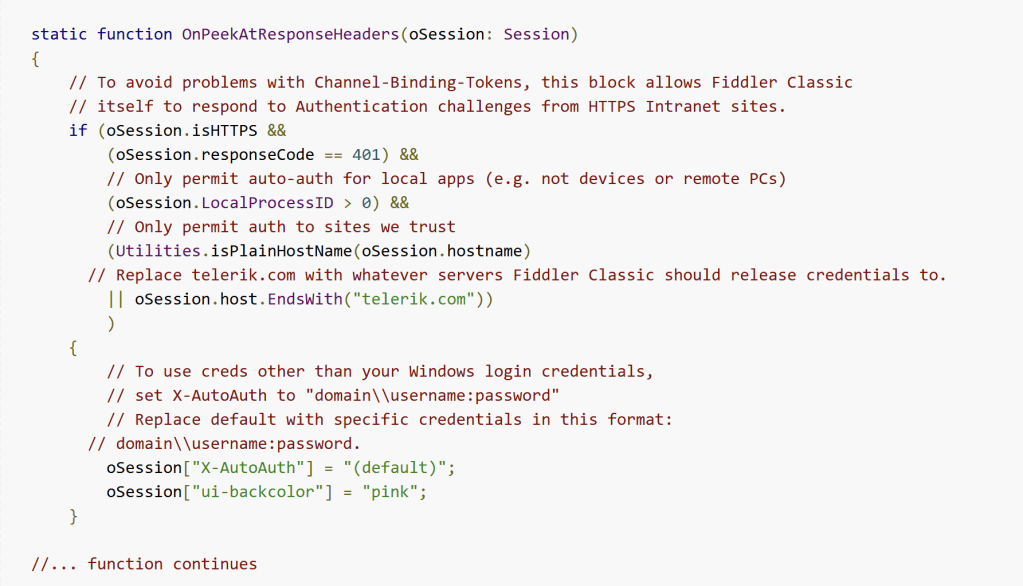
With default code, Fiddler will highlight sessions fallen under filter with pink color.
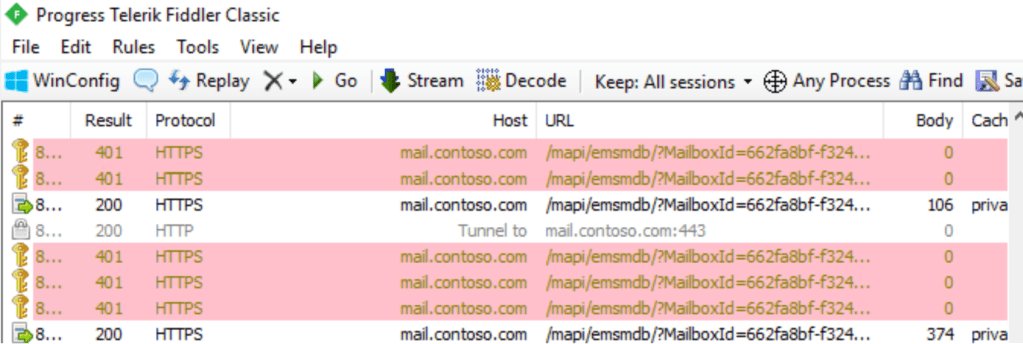
Another way to use Fiddler with EP enabled is set the “Automatically Authenticate” option in the Rules menu. This will instruct Fiddler to automatically respond to the gateway proxy authentication challenge. This sets the ‘x-AutoAuth‘ property of the Fiddler sessions to ‘(default)’. But this doesn’t allow to define servers Fiddler should release credentials to.
💡Note. Decrypted data captured by Fiddler can contain sensitive information, like credentials. If you’re going to use Fiddler in your production environment – research for its documentation carefully and consult your security department.
End.
 EWS Free Area
Leave a comment