
🏗 Infrastructure Overview
Example environment:
- Exchange Server 2019 CU14, multiple mailbox servers in DAG, Hybrid Environment
- Domain Controllers on Windows Server 2016/2019 across multiple sites.
- Mailbox migrations were in progress as part of migration to the cloud and DAG rebalancing.
❗ Problem Statement
The team observed intermittent mailbox move failures with error:
Access Denied when updating Active Directory attribute homeMDB
Failures were random – not all moves were affected, both for cloud and internal on-premises migrations.
Additional findings:
- Permissions for problematic mailboxes were checked — no custom ACEs, inheritance enabled, Exchange Servers group had all required rights.
- Basic connectivity and authentication checks (Kerberos, LDAP) passed successfully with nltest.
However, mailbox moves still failed periodically.
⚙ What is MRS and Why It Matters
The Mailbox Replication Service (MRS) is the core Exchange service responsible for:
- Mailbox moves (intra-org and cross-forest)
- Hybrid migrations
- PST import/export
MRS performs extensive AD operations during a move, including updating attributes like homeMDB and msExchHomeServerName.
🔎 Observed Symptoms
- NLTest results OK, DNS SRV records resolve DCs correctly.
- Yet, on mailbox servers, you could see something in event Logs:
Log Name: Application
Source: MSExchange SACL Watcher
Date: 7/27/2025 7:55:01 AM
Event ID: 6003
Task Category: General
Level: Error
Computer: EXCH.contoso.com
Description:
SACL Watcher servicelet encountered an error while monitoring SACL change.
Got error 1722 opening group policy on system EXCH.contoso.com in domain contoso.
Some events from MSExchangeADTopology can also show, that some domain controllers considered as not available. I cannot reproduce this issue in my test lab with one DC only, in my case Exchange is not able to find any available DC:
Log Name: Application
Source: MSExchangeADTopology
Date: 7/27/2025 7:53:35 AM
Event ID: 2104
Task Category: Topology
Level: Error
Computer: EXCH.contoso.com
Description:
Process Microsoft.Exchange.Directory.TopologyService.exe (PID=6108). Forest contoso.com. Topology discovery failed due to LDAP_SERVER_DOWN error. This event can occur if one or more domain controllers in local or all domains become unreachable because of network problems. Use the Ping or PathPing command line tools to test network connectivity to local domain controllers. Run the Dcdiag command line tool to test domain controller health. Error Details Active Directory server is not available. Error message: Active directory response: The LDAP server is unavailable.
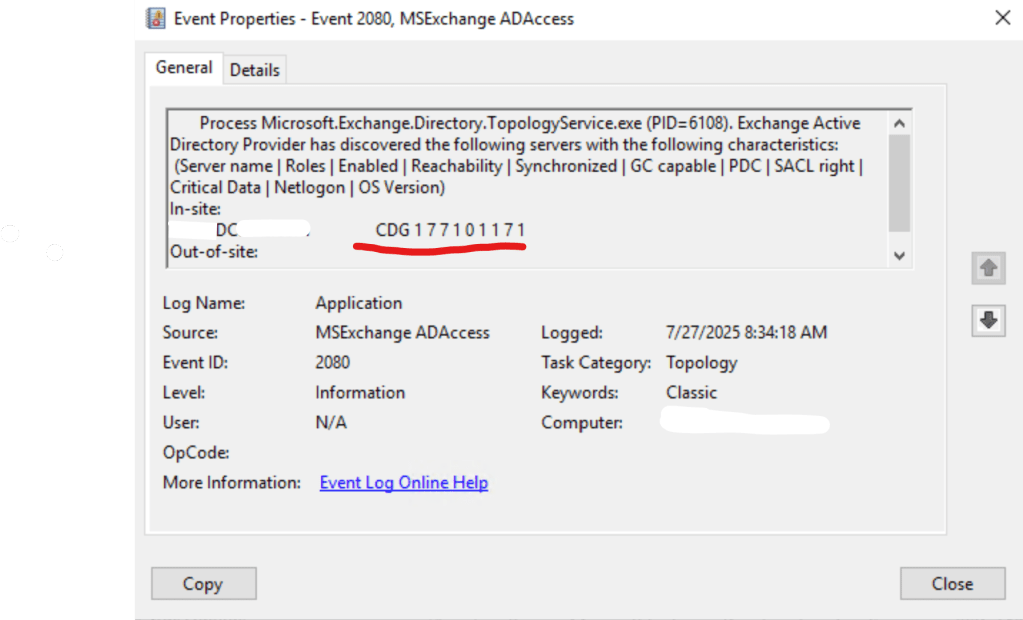
You can also verify event if 2080 from MSExchange ADAccess, to verify which DCs are considered as available and corresponding roles on them:
🧩 Root Cause
The root cause was security hardening – disabling SMBv2 and SMBv3 breaks RPC Named Pipes, which are used by:
- Netlogon and LSA RPC for security checks.
- Group Policy access (SYSVOL).
- DSAccess components in Exchange that use RPC for advanced security descriptor operations.
MRS relies on these RPC calls when:
- Validating permissions.
- Updating mailbox attributes during a move.
With SMBv2/3 disabled:
- LDAP queries can still work → nltest passes.
- But RPC over SMB for Netlogon fails silently → Access Denied or Topology service loses DC connectivity.
❗ Why Only Some Moves Fail
- Environment had multiple DCs; some had SMBv2/3 disabled, some didn’t.
- When Exchange AD Topology Service selects a “bad” DC → mailbox move fails.
- When a healthy DC is picked → move succeeds.
🔍 What NTLM Has to Do With It
- MRS often uses NTLM for background service authentication when Kerberos is not practical.
- NTLM challenge-response uses Netlogon over RPC, which rides on SMB.
- Break SMB → break NTLM-based RPC calls.
- It’s not supposed to disable NTLM for server to server connectivity
✅ Microsoft Best Practice
Do not disable SMBv2 or SMBv3. There is no security benefit, and it breaks functionality.
📎Detect, enable, and disable SMBv1, SMBv2, and SMBv3 in Windows Remove SMBv1 (mandatory).
- Keep SMBv2/3 enabled — they are secure and required for Windows features.
- SMBv2/3 provides signing and encryption; NTLM traffic is protected if SMB signing is enforced.
💡 Lessons Learned
- Mailbox moves silently depend on SMB.
- Disabling SMBv2/3 creates intermittent and hard-to-diagnose failures in multi-DC environments.
- Tools like nltest only validate LDAP/Kerberos — not RPC over SMB.
✅ Recommended Resources
- 📎Overview of Exchange services on Exchange servers
- 📎Mailbox moves in Exchange Server
- 📎Active Directory in Exchange Server organizations
- 📎NTLM Over Server Message Block (SMB)
- 📎SMB Relationship to Other Protocols
- 📎Detect, enable, and disable SMBv1, SMBv2, and SMBv3 in Windows Remove SMBv1 (mandatory).
The end.
 EWS Free Area
Leave a comment