
Recently I had a requirement to reconfigure my test environment to have hybrid config with new tenant. This also happens with different customers from time to time.
I will not go though all the steps, as where are a lot of resources on this topic. Actually, you need to reinstall Azure AD Connect and re-configure it with new tenant. Next, you will need to re-run Exchange Hybrid Configuration Wizard (HCW).
But I would like to mention a couple of things I experienced and wasn’t able to find any recommendations on that so far.
📌1. In my case I needed to reinstall Azure AD connect on the same machine. It’s not a complex task, but after it was reinstalled, Microsoft Azure AD Sync service was hung on start up. This service was configured to start from dedicated service account called ADSyncMSAd*. Also, profile for that account was created as temporary, connections to database were unsuccessful according to AADC logs.
Anyway, it was easier to remove that account from Active Directory and reinstall Azure AD connect.
📌2. After Azure AD connect was installed and configured successfully we need to re-run HCW, add our domains to new tenant.
At this step, HCW will configure new organization relationships, intra organizational connector and other configuration items.
Although configuration finished successfully, OAUTH verification via Test-OAuthConnectivity cmdlet doesn’t work so far.
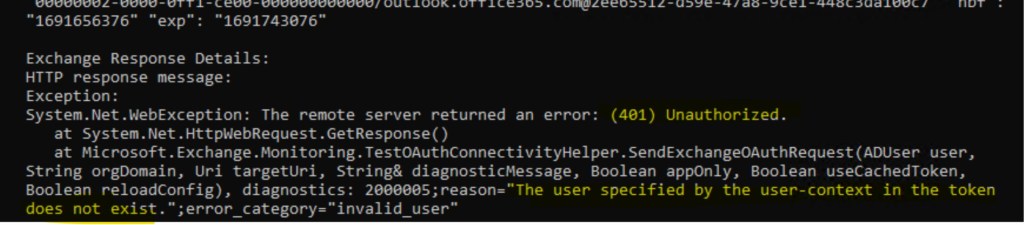
Next step is to check configuration objects with following cmdlets in Exchange on-prem:
- Get-AuthServer
- Get-OrganizationRelationship
- Get-IntraOrganizationConnector
And remove corresponding objects left from previous hybrid config.
📌3. HCW usually doesn’t touch Federation Trust and doesn’t create it. You could create Federation Trust earlier for legacy versions of Exchange Server, or to access online archive with OWA as described here. But if some settings were changed during migration to new tenant, Federation Trust should be updated manually.
For example, if new domain was introduced, you need to add it with Add-FederatedDomain and verify it with get-FederatedOrganizationIdentifier.
End.
 EWS Free Area
Leave a comment